
What's up Flyers 
I'm going to explain an easy (but sometimes annoying ) system that we have.
Items Model Change
Okay, first of all, this is just an aesthetic thing, to the people that likes how an specific item looks but they don't need the stats, just the appearence of it.
Let's see where this system is located:
Find on the start button, "Prologic Systems", then look for "Model Change"
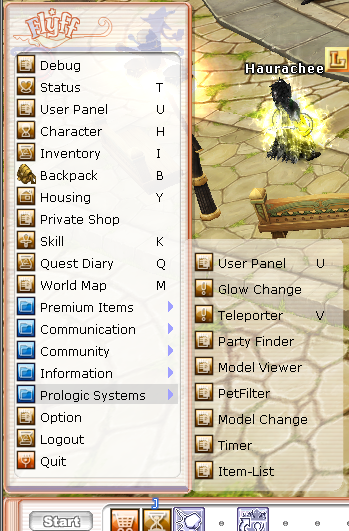
Then, this small window will come up
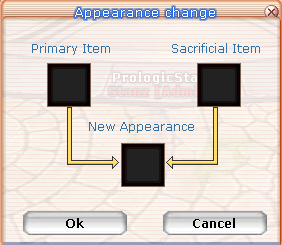
So, let's see how this works...
Examples 
In this case, i want to have my Grim Gauntlet but i don't really like it appearence  , so im adding the Shurand Gauntlet appearence, to give my set a better look

So, the PRIMARY ITEM is the one that will be preserved on STATS and equipment, and will look the same way on the inventory, BUT... The Sacrificial Item is the one that will be the appearence of your PRIMARY ITEM, just for that, and will be deleted on stats, just like a sacrifice, to have it's look.
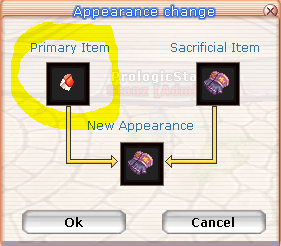
Then, you have your Grim Gauntlets normally but now you have the look of the Shurand Gauntlets 
I will show you how it looks in-game
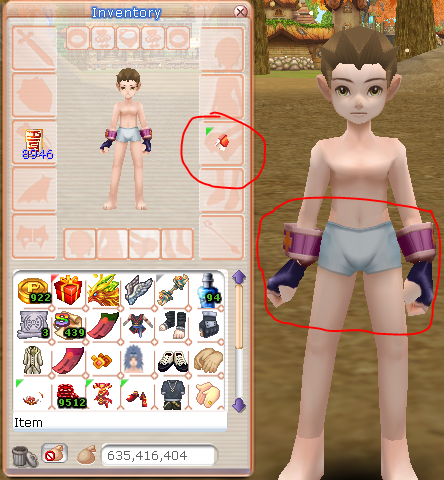
I'ts done Flyers keep having fun!
Edited